Write and revise a guide
Use drafts to prepare new instructions without replacing the version customers are currently reading.
Open the publishing desk
Sign into the AtlasCAD website with your approved Atlas Systems staff identity and open Staff console. Community server owners and operational CAD admins do not automatically have product-site staff access.
Prepare a draft
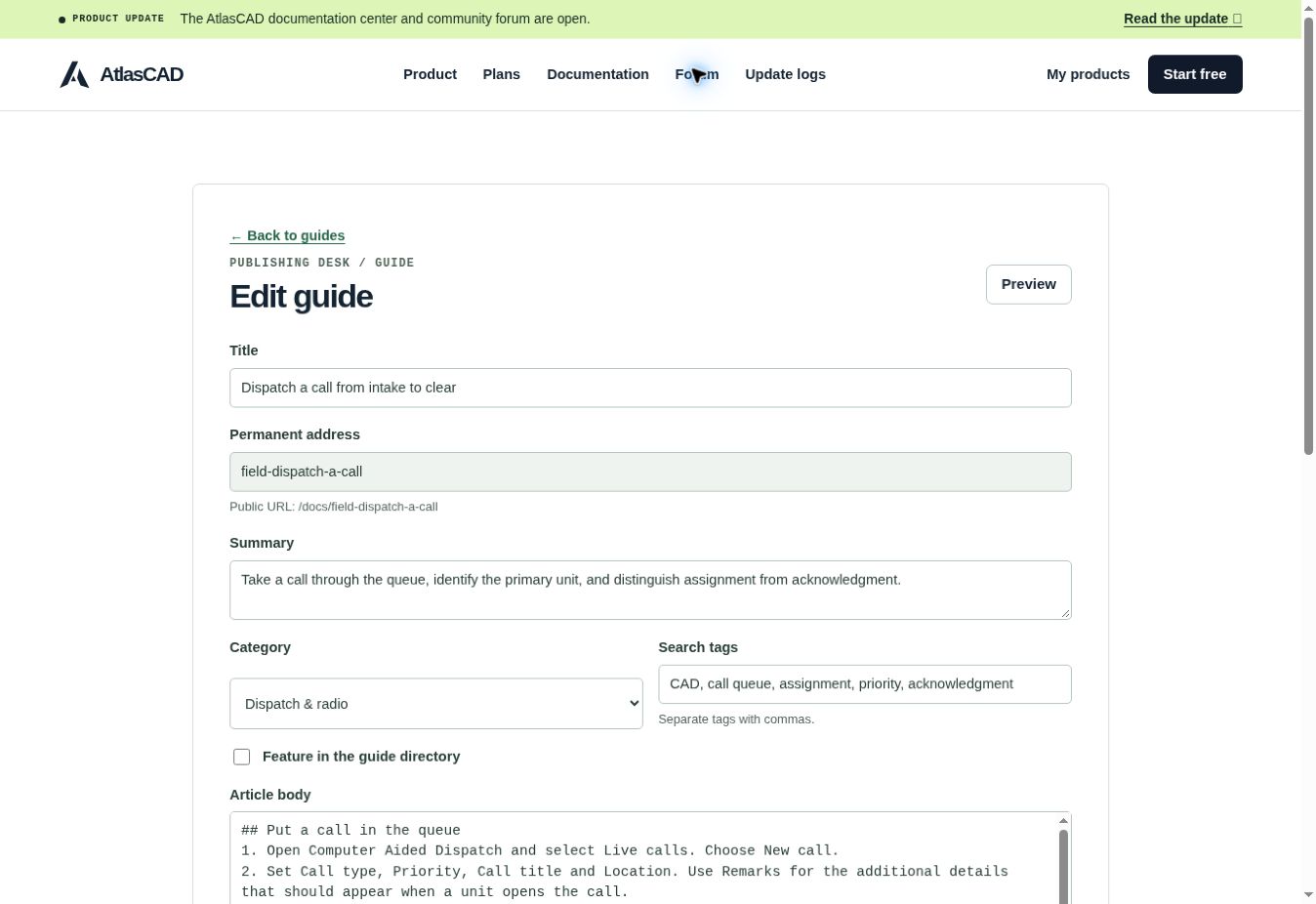
- Select Guides, then New guide. Write a title and a short summary that tells a reader what they can do afterward.
- Pick a category. Add search tags using the terms people see in the product. The slug becomes the permanent link once the first draft is saved.
- Use ## for a section heading and numbered steps for a sequence. Write the visible control label and the expected result. Use Preview to read the article as a customer would.
- Save draft. To add a screenshot, save the draft first, upload an image, enter descriptive text, and save again. Use sample data and crop private details.
Publish and correct an article
Publish makes the current editor contents public. Later draft edits stay private until you publish again. If two people edit the same revision, the second save is rejected so neither silently overwrites the other. Keep a copy of your unsaved text and reload before applying your changes.
Remove an outdated article
Unpublish removes the article from public search and its direct public URL. The draft remains in the staff console and can be revised and republished at its original address.